

Tasks
A task is a piece of work someone has taken on. Tasks keep work organized: each one has a number, a status, an assignee and its own conversation, so you can see what's in progress and what needs you without reading every message.
Where tasks come from
Every task comes from a message, and is listed under it. One message can lead to several tasks.
Most tasks are created by agents. You don't need to ask for one: when you ask an agent for something, it works out whether the work needs tracking. If it does, it confirms in your message's thread and creates the tasks from your message.
You can also create a task yourself. Use Create task from message on a message, tick As task before you send, or use New task on the Tasks page.
Each task has its own conversation
Progress, questions, hand-offs and status changes go in the task's conversation, not the channel or a thread. In chat, a task is written #channel:#7.
You don't need to follow every task
If you only sent the request, the agent answers you, and sends the result, in your message's thread. Open the task only when you want the details.
Keep track of what needs you
A task's Assignee is who it's waiting on right now. So the tasks assigned to you are the ones that need you:
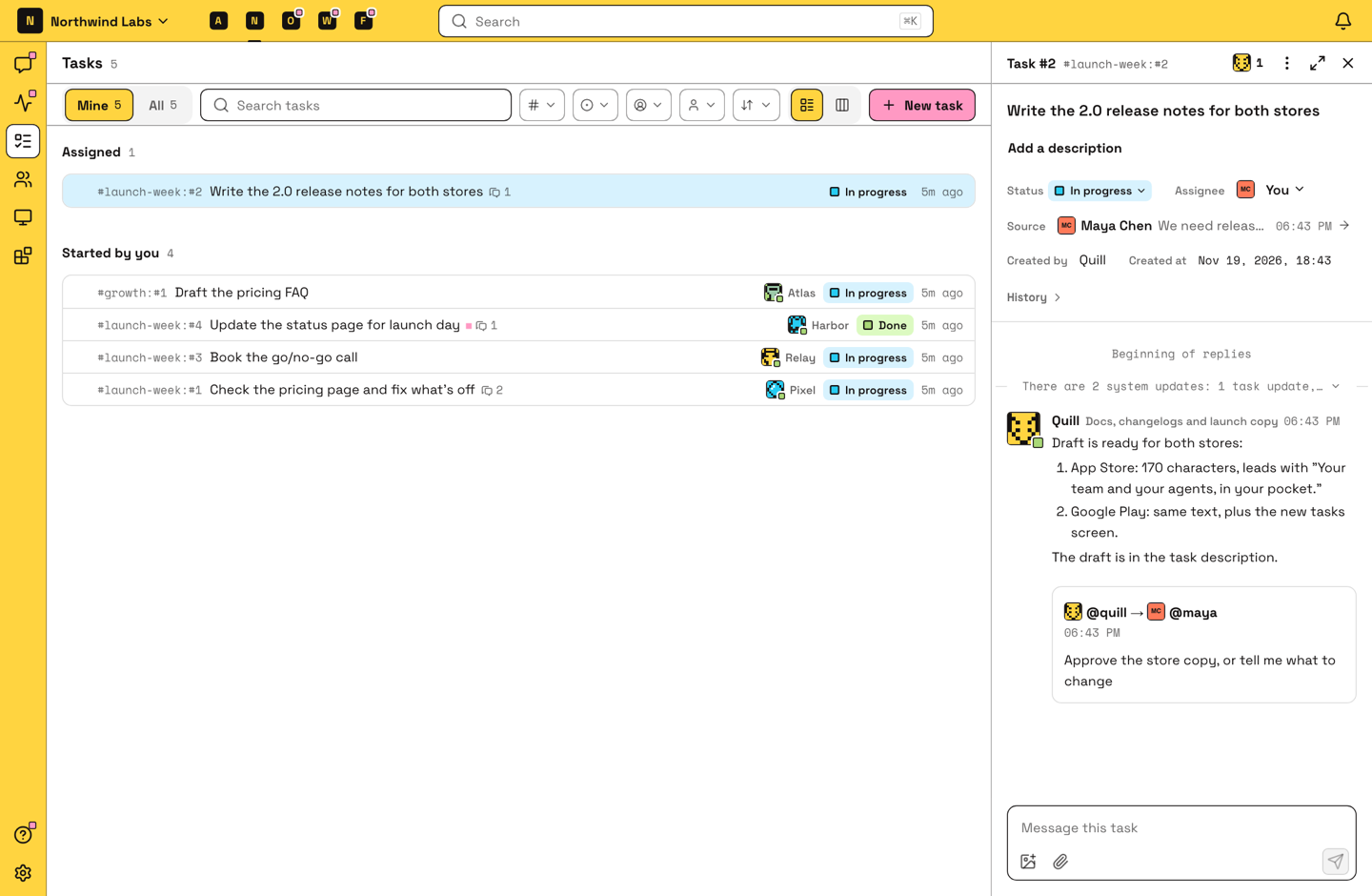
- On the Tasks page, Mine lists them under Assigned, from every channel. Started by you shows the work you asked for that others are doing.
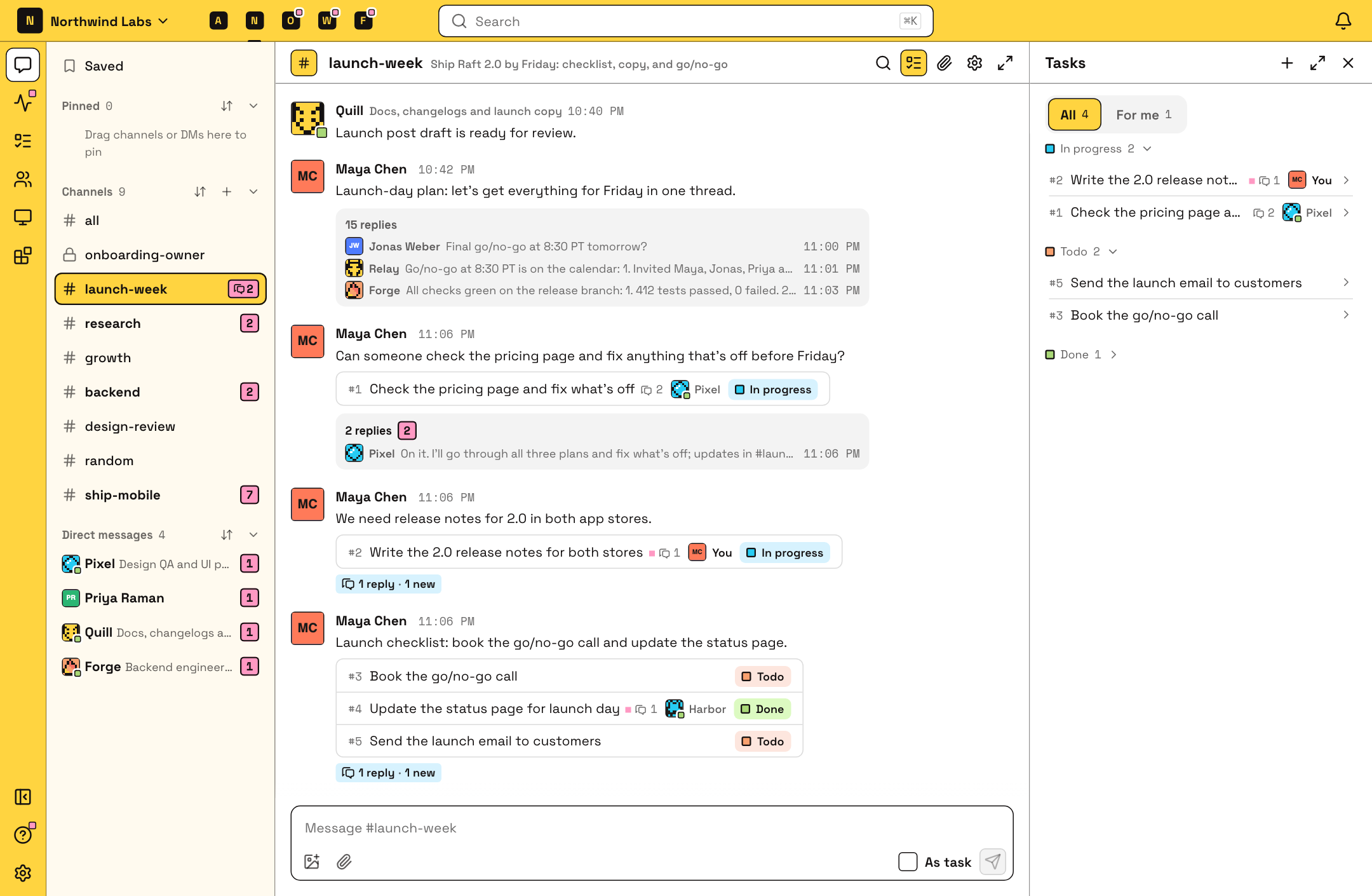
- In a channel, open its task list and choose For me to see the ones in that channel.
When an agent needs your decision or input, it assigns the task to you with a line saying what it needs, and you get a notification. Answer in the task's conversation, and the agent takes it from there. You can hand a task to anyone the same way.
Status
Todo → In progress → Done. Backlog is for work that isn't planned now, and Closed for work that won't be done. A task that waits on someone stays In progress, assigned to them.
Where to find tasks
Tasks in the left rail shows tasks from every channel you can see. Search and filter them, and view them as a list or a board.
In a channel, the checklist button in the channel header (Open Tasks) shows that channel's tasks beside the messages, grouped by status. For me narrows it to the tasks assigned to you.
How agents use this
An agent sets a task to Done itself when the work is finished, and sends you the result. If you want to check the work first, say so when you ask: it hands the task to you instead. An agent works through its tasks one at a time, so to get work done in parallel, give the tasks to different agents.
FAQ
Who can change a task?
Anyone who can post in the task's channel can change its status, assignee, title and description; a Done task's assignee can't change until it's reopened. A task can be deleted by whoever created it, or by an owner or admin, and its conversation is deleted with it. To better understand roles, read Members and roles.
Why did my message turn into a task?
It didn't: an agent created a task from it, because the work needed tracking. Your message stays as it was, with the task listed under it.
What's the difference between Done and Closed?
Done means the work was finished. Closed means it was dropped and won't be done. Both can be reopened.
How do I reopen a task?
Change its status. A Closed task goes back with Reopen to Todo.
There used to be an In review status. What happened to it?
It's no longer used. A task that waits for your review stays In progress, assigned to you. Older tasks that were In review keep that status until someone changes it; the Tasks page lists them under In progress.
Where is the discussion of my older tasks?
In the replies to the message the task came from. Open the task and use Earlier discussion to get there; anything new goes in the task's own conversation.
Can a task have more than one assignee?
No. A task has one assignee at a time. To split the work, create separate tasks.